Git Workflow
Git Branching Strategy
Overview
Our general Git workflow uses three main branches:
- develop: Development branch
- uat: User Acceptance Testing branch
- master: Production
Project work begins on the develop branch, with feature branches created for individual tasks or enhancements.
All work is completed in feature branches and merged into develop via Pull Requests (PRs)
Branch Naming Conventions
- Feature branches should follow the format:
feature/[ADO_task_number]_[description]- Example:
feature/46499_drilling_anomaly_xgboost_experiment
- Example:
Workflow Steps
1. Feature Development
- Create a feature branch from the project’s
developbranch. - Complete work and commit changes to the feature branch.
- When ready, open a Pull Request to merge the feature branch into
develop. - All merges into
developmust be completed via PRs, with policies in place to enforce this. - When merging, squash commits into a single commit and delete the feature branch after merging.
2. Deploying to UAT
Once features are ready for testing, changes are moved from develop to uat.
- All code should be reviewed to ensure it satisfies coding standards.
- Sync branch before merging develop into
uat. - All merges into
uatmust be done via PRs. - At least one reviewer should be added for merging into
uat. - Direct updates to
uatare prohibited. - Do not delete the
developoruatbranches after merging. - After merging,
developanduatshould have similar, linear histories. - CI/CD Integration: Opening a PR to
uattriggers automated CI pipelines that run unit and integration tests. These tests validate model training, inference, and monitoring workflows in the UAT Databricks workspace. Logs and test results are available in the PR UI. Failed tests must be resolved before merging.
3. Deploying to PRD
- After successful UAT testing and approval, changes are merged from
uatintomaster. - Sync branch before merging
uatintomaster. - All merges into
mastermust be done via PRs, with team leads and infrastructure admins as approvers. - Direct updates to
masterare prohibited. - Do not delete the
uatormasterbranches after merging. - After merging,
uatandmastershould have similar, linear histories. - CI/CD Integration: Merging into
mastertriggers automated deployment to the production Databricks workspace. The trained model is registered as a challenger in Unity Catalog and compared against the current champion. If it passes validation, it is promoted to champion and deployed for production use.
Hotfixes
- For urgent fixes in production, create a
hotfixbranch frommaster. - Complete the
hotfixand squash commits intomastervia a PR. - After deploying the
hotfixtomaster, pull the fix back intodevelopanduatand sync to ensure all branches remain up to date.
Preparing Your Branch for a Pull Request
Before opening a Pull Request (to branches such as develop, uat, or master), it’s best to synchronize your branch with the latest changes from the target branch. This ensures you:
- Resolve potential merge conflicts early.
- Test your code against the most up-to-date version.
Databricks Git integration provides three options for this:
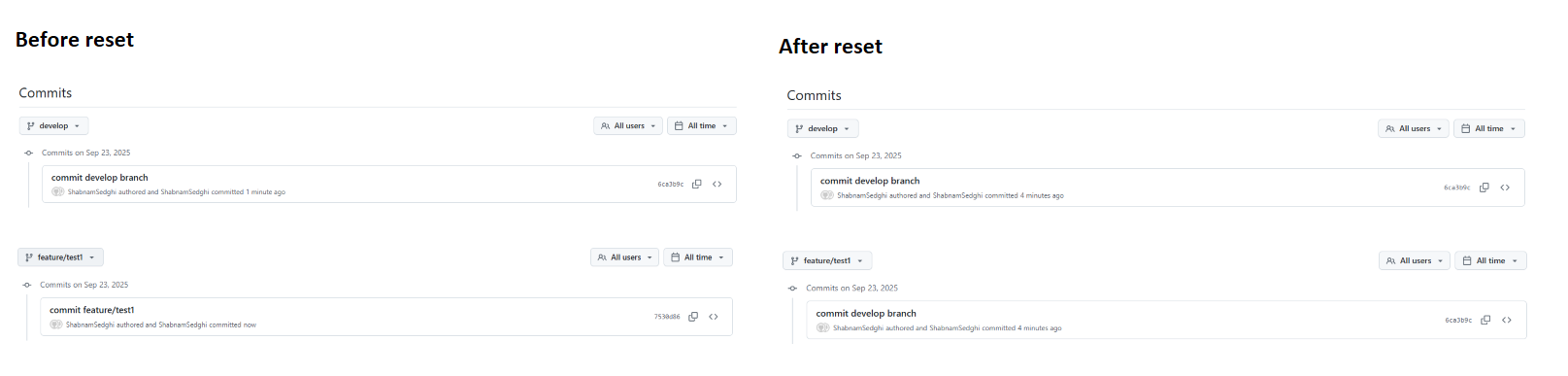
1. Reset (❌ Not Recommended)
Access the Git Reset operation by selecting it from the kebab menu (⋮) in the upper-right corner of the Git operations dialog.
git resetreplaces the contents and history of your branch with the most recent state of another branch.- Use this only if your local edits conflict with the upstream branch and you are fine with discarding those edits entirely.
- Resetting will cause you to lose all uncommitted and committed changes, both locally and remotely, if you force-push afterward.
⚠️ Because of the risk of data loss, this option is generally not recommended.
2. Merge (✅ Recommended)
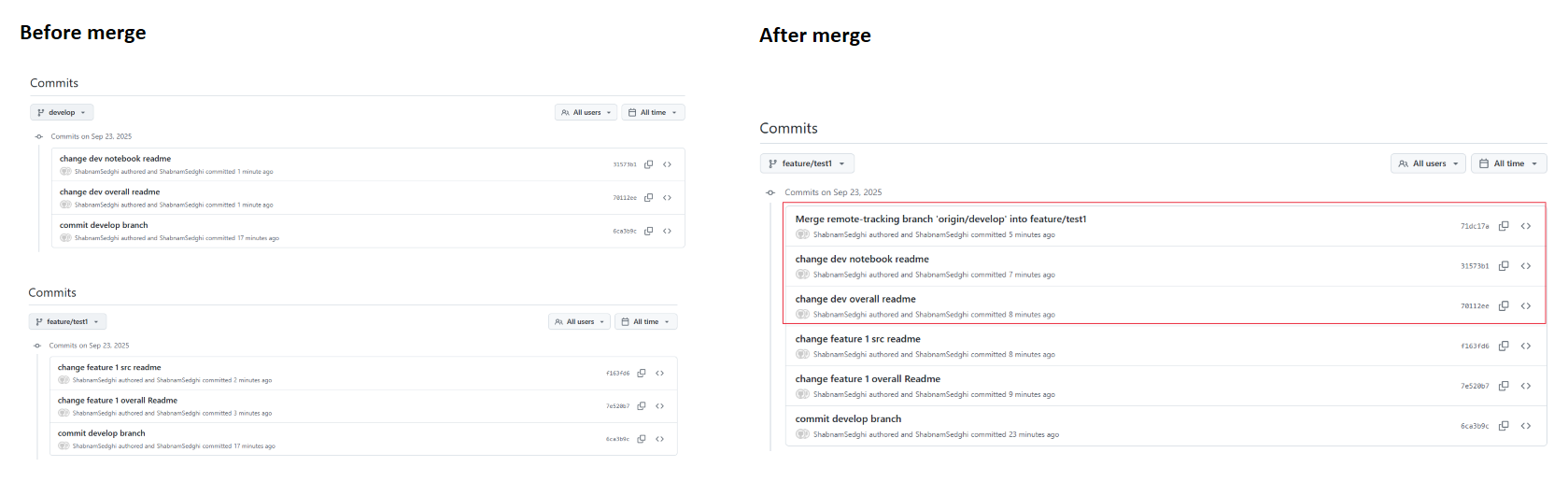
Access the Git Merge operation by selecting it from the kebab menu (⋮) in the upper-right corner of the Git operations dialog.
- The merge option works like a standard
git merge. - It combines the commit history from the target branch into your current branch.
- The result preserves all commits from both branches, creating a “merge commit” if necessary.
- Unlike rebasing, merging does not rewrite commit history and therefore does not require force-pushing.
👍 This makes merge the safest and most collaboration-friendly approach, and the recommended option when working in shared repositories.
3. Rebase
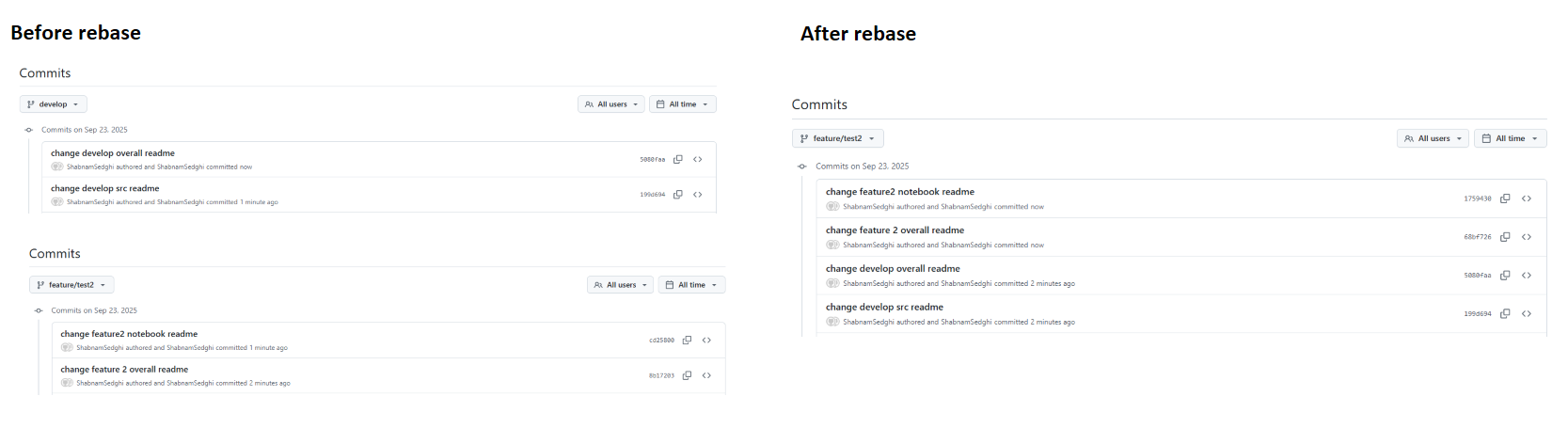
Access the Git Rebase operation by selecting it from the kebab menu (⋮) in the upper-right corner of the Git operations dialog.
- Like merging, rebasing integrates changes from one branch into another.
- However, rebase rewrites commit history to create a linear sequence of commits:
- Saves your current branch’s commits temporarily.
- Resets your branch to the target branch.
- Reapplies your saved commits one by one.
This results in a cleaner, linear history — but it comes with risks:
- Rebasing can cause issues for collaborators if they have already pulled the original branch, since history has changed.
- Rebasing often requires
--forcepushing to update the remote branch.
⚠️ Use rebase only if you and your team are comfortable with rewriting history and are aligned on its usage.
Pull Request Checklist
- PRs should only be submitted after the work has been completed and thoroughly tested.
- Each PR to uat and master must include:
- A clear description of the proposed changes.
- A summary of improvements or issues resolved by the PR.
- Any updates to documentation or deployment considerations.
- Confirmation that the code follows the guidelines provided in this document.
- For production deployments, ensure a change request is created, approved, and attached to the PR.
Approvals & Policies
develop: All merges via PR, enforced by policy.
uat: All merges via PR, with designated approvers.
master: All merges via PR, with team leads and infrastructure admins as approvers.
Notes
All merges should be synchronized to maintain a clean, linear history.
Feature branches are deleted after merging into develop.
develop, uat, and master branches are persistent and should not be deleted.
Hotfixes are managed via dedicated branches from master and merged back into develop and uat.
All merges into
develop,uat, andmastermust follow PR-based workflows.CI/CD Enforcement: Ensure pipeline YAML files (e.g.,
mlopstemplate-tests-ci.yml) are added to branch policies foruatto enforce validation and deployment checks.