How WIPA Water Works
Model Background
Model – Regions
Model Region Intro
Similar to WIPA, the water forecast model is intended for water predictions in the unconventional Montney fairway.
Models cover the entire Montney trend (except more conventional regions with low pressure gradient and excluding Ante Creek).
These areas were removed from the model because the geological and reservoir models do not properly characterize the reservoirs in those regions.
Models utilize regional geological and reservoir grids.
Well Classification: In‑Scope vs Out‑of‑Scope
Out of Scope
Regions that are conventional as defined by pressure gradient (kPa/m) and distance to shoreline (km) are excluded. Values are ARC Zone Specific.
Conventional: Pressure Gradient < 9.3 kPa/m
Transition Region (Kaybob / Simonette):
- Pressure Gradient > 9.3 kPa/m AND Distance to Shoreline < 60 km AND MWC7+ < 145
- Pressure Gradient > 9.3 kPa/m AND Distance to Shoreline < 92 km AND MWC7+ > 145
In‑Scope
In‑scope wells are classified to exist in three regions:
- Gas
- Gas‑Liquid
- Liquid
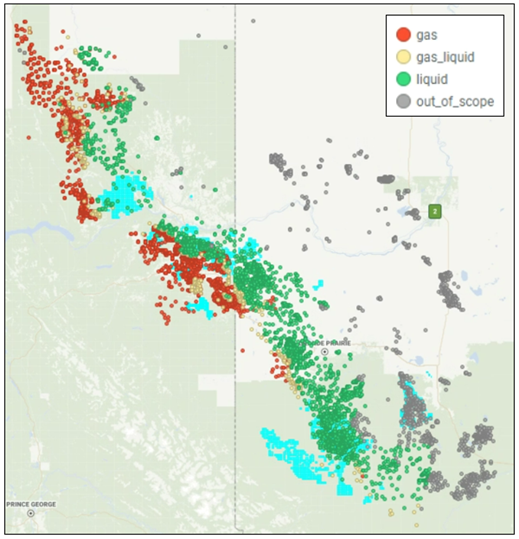
Gas: MWC7+ < 135. Primary product is anticipated to be gas with minimal liquids
Gas‑Liquid: 135 < MWC7+ < 145 AND Distance to Shoreline > 60 km.
Liquid: MWC7+ > 145 AND Distance to Shoreline > 92 km. Primary product is anticipated to be liquids with secondary gas.
The water forecast model encompasses all regions—Gas, Gas‑Liquid, and Liquid—within a single unified model. While the models are not separated by region, evaluation results are documented individually for each region, as water data quality varies across them.
Model - Filters
Water measurements are prone to errors, especially in gas zones. To improve data quality, several filtering steps were applied to exclude wells with questionable water data from model training and testing:
- Wells drilled before 2013 or with proppant intensity below 0.5 T/m.
- Wells showing restricted production, indicated by a lower-than-expected decline in production during the early months.
- Wells located within the same pad and completion year where at least one well lacks recorded produced water.
- Wells that were energized or used foam.
- Wells reporting gas or condensate but no water during early production.
- Wells exhibiting increasing cumulative Water-to-Gas Ratio (WGR) profiles.
Model - Response Variables
Prediction (1, 3, 6, 12 months):
- Cumulative water (bbl) per 100m
Model - Features
Total Features: 8
Geology/Reservoir Features
- VSS
- Insitu Index
- TOC
- Kamath permeability nD
- VCLAY
- Pressure Gradient
Well Design Features
- Fluid Per Length (m3/m)
- Perf Cluster Spacing (m)
Model Update History
| Version | Date | Updates |
|---|---|---|
| 1 | Initial release of model |
Using The Model
The model is registered in the Unity Catalog at:
- 1 month forecast: prd_zone3.wipa.combined_regions_01_grosswater_bbl_cume_lightgbm_model
- 3 month forecast: prd_zone3.wipa.combined_regions_03_grosswater_bbl_cume_lightgbm_model
- 6 month forecast: prd_zone3.wipa.combined_regions_06_grosswater_bbl_cume_lightgbm_model
- 12 month forecast: prd_zone3.wipa.combined_regions_12_grosswater_bbl_cume_lightgbm_model
Model Inference - Mosaic
This product supports the budgeting process by generating water forecasts (WGR) for newly budgeted wells and uploading them into Mosaic. The workflow for completing the inference is as follows:
- Data Retrieval: Retrieve cumulative gas forecasts and well designs for budgeted wells from Mosaic, as entered by the engineering team. Combine this data with the wells’ reservoir and geological features.
- Prediction: Use the collected inputs in the model to predict cumulative water production. Convert this prediction, using the engineering-provided cumulative gas forecast, into cumulative WGR.
- Curve Fitting: Apply curve-fitting to the cumulative WGR, assuming it remains constant after month 12.
- Conversion: Convert cumulative WGR back to instantaneous WGR using cumulative water and gas values.
- Upload to Mosaic: Upload the instantaneous WGR into Mosaic for wells that do not yet have a water forecast, eliminating the need for engineers to manually enter WGR values. Engineers retain the ability to adjust these forecasts as needed.